A lot of buzz has been going around these days about websites not keeping your private information to themselves. I don't intend to go into 'whether this should be allowed or not' or 'what's right or not' in this blog.
I assume the above information is true, and that they are leaking your information. So what now?
OOP
When I was a student in OOP (Object Oriented Principles), I was introduced to the world of objects. An object is any entity that exists in your system context. An object has attributes (which determine it's state) and operations (which determine it's behavior). OOP also included important terms - 'encapsulation' and 'information hiding' which allowed these objects to be in full control. They were responsible to safeguarding their state. I'd like to treat each individual as an object and apply encapsulation and information hiding on him.
Private and Privacy?
Which information is considered private? While one considers information about his family 'private', the other says that it's his 'credit card' and 'bank-account' information, and a third his 'religious beliefs'. The content of what's considered private differs across cultures and individuals. Privacy is the ability to protect this information and reveal it selectively.
Designing the Private
 Tricky and complex as it may sound, it's actually not that hard. Yes, it would not be possible to construct a generic, true-in-the-world-context model, but a simpler form is very much conceivable. Allow me to paint the following picture. Since each individual is his own judge to what's private to him, it's not difficult to build a simple object diagram with this information. Something along these lines..
I assume the above information is true, and that they are leaking your information. So what now?
OOP
When I was a student in OOP (Object Oriented Principles), I was introduced to the world of objects. An object is any entity that exists in your system context. An object has attributes (which determine it's state) and operations (which determine it's behavior). OOP also included important terms - 'encapsulation' and 'information hiding' which allowed these objects to be in full control. They were responsible to safeguarding their state. I'd like to treat each individual as an object and apply encapsulation and information hiding on him.
Private and Privacy?
Which information is considered private? While one considers information about his family 'private', the other says that it's his 'credit card' and 'bank-account' information, and a third his 'religious beliefs'. The content of what's considered private differs across cultures and individuals. Privacy is the ability to protect this information and reveal it selectively.
Designing the Private
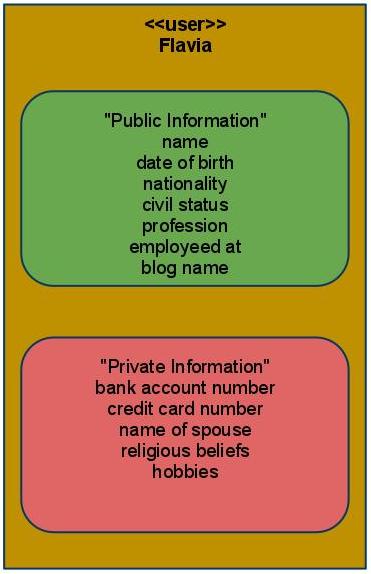 Tricky and complex as it may sound, it's actually not that hard. Yes, it would not be possible to construct a generic, true-in-the-world-context model, but a simpler form is very much conceivable. Allow me to paint the following picture. Since each individual is his own judge to what's private to him, it's not difficult to build a simple object diagram with this information. Something along these lines..
This achieves two things - makes you think what's private to you and makes you aware what you'd like to share with these websites. I believe that self-awareness is already a victory achieved.
So the next time you come across a news article on a privacy leak, you know you have your list with you!
